Your Ad Here

they say..


ShoutMix chat widget

How to resize images and pictures using Fotosizer

Tuesday, October 14, 2008

Windows Live Gallery does allow photo resizing, but it is not part of the OS and quite frankly I don’t like it very much, so I started searching for an alternative.

I found Fotosizer, which is a really cool utility for resizing and converting images in batches.

As you can see from the screenshot, it is a very basic software application

, all it does is resize photos and optionally convert their format on output. I only now just got this done as it was so easy using Fotosizer.


fotosizer


You can choose standard sizes for the conversion, or you can specify a custom size, you can also choose to overwrite these settings if an image has been rotated and apply them the opposite way around. A major bonus is the conversion on output section, this is great if you want to change the format of the image at the same time as resizing it.

saveas


Overall this is a really useful little application, definitely doubly so if you run Vista, ok most graphic applications such as Photoshop allow batch resizing, but it requires some effort to set up the processing and it takes a while to do, Fotosizer is a snap to use, you can set up a batch to process in seconds.


The actual conversion and resize process is quite swift, I had the software resize over 3000 images for me in one batch, it took around 12 minutes to achieve this in total, including setting up the batch process itself, which is quite a respectful speed for such a lot of image manipulation.


Anyone looking for a simple application to manipulate images, resize them and change their storage format would do well to take a look at this free little application that does the job so elegantly, definitely something I will be adding to my list of applications to be installed every time I reformat my drive in the future.

Read more...

Configure number of rows and columns Alt-Tab Task Switcher

Wednesday, October 8, 2008

Did you know that when you press ALT + TAB to switch between programs in Windows, you can actually configure the number of rows and columns used to display the list of icons? I recently found this out (kind of late), so I thought I would share it if case you want to customize the default settings.

I actually wanted to modify the normal behavior of the Task Switcher feature because I have a widescreen display and a high resolution monitor. By default, Windows only allows seven icons in a single row and only two rows. However, I routinely have well over 20 windows open on my desktop and I wanted all 20 to be shown across in one row like this:


alt tab switcher


Cool eh! So how can you change the number of icons that show up per column and per row when pressing Alt + Tab? Hack the registry! Read on.

Step 1: Click on Start, then Run and type in regedit and press Enter.


regedit


Step 2: Navigate to the following Registry key in the left side nav menu:

HKEY_CURRENT_USER\Control Panel\Desktop

There are three keys that you want to take note of: CoolSwitch, CoolSwitchColumns, CoolSwitchRows. CoolSwitch can have two values: 0 for disabled and 1 for enabled. CoolSwitchColumns is by default 7, but you can change this to any number you like. CoolSwitchRows is by default 2, but you can increase the number of rows also.


coolswitch


I changed mine to 15 columns and 3 rows! That way I can have 45 windows open and be able to switch between them! Kind of crazy, but useful for some people.

In order for the changes to take effect, you have to either Logoff or Restart the computer. Now enjoy your new fully configured CoolSwitch application switching.

If you don’t like the default ALT + TAB user interface, you might want to check out Alt-Tab Thingy, a cool freeware app that replaces the default Alt-Tab CoolSwitch feature in Windows. Enjoy!

Read more...

Top 5 Jokes of the week

Thursday, October 2, 2008

#1 I know the whole truth

At school, a boy is told by a classmate that most adults are hiding at least one dark secret, and that this makes it very easy to blackmail them by saying, "I know the whole truth" even when you don't know anything.

The boy decides to go home and try it out. As he is greeted by his mother at the front door he says, "I know the whole truth." His mother quickly hands him $20 and says, "Just don't tell your father."

Quite pleased, the boy waits for his father to get home from work, and greets him with, "I know the whole truth." The father promptly hands him $40 and says, "Please don't say a word to your mother."

Very pleased, the boy is on his way to school the next day, when he sees the mailman at his front door. The boy greets him by saying, "I know the whole truth."

The mailman drops the mail, opens his arms and says, "Then come give your FATHER a big hug!"


#2 Poooor Husband...!.?.?


A father put his three year old daughter to bed,

Told her a story and listened to her prayers which she ended by saying

"God bless Mommy, God bless daddy, God bless grandma and good-bye
grandpa."

The father asked, "Why did you say good-bye grandpa?"

The little girl said, "I don't know daddy, it just seemed like the thing
todo."

The next day grandpa died.

The father thought it was a strange coincidence.

A few months later the father put the girl to bed and

listened to her prayers, which went like this:

"God bless Mommy, God Bless daddy and good-bye grandma."

The next day the grandmother died.

Oh my god, thought the father, this kid is in contact with the other
side.

Several weeks later when the girl was going to bed the dad heard her
say,

"God bless Mommy and good-bye daddy."

He practically went into shock.

He couldn't sleep all night and got up at the crack of dawn to go to his

office.

He was nervous as a cat all day, had lunch sent in and watched the
clock.

He figured if he could get by until midnight he would be okay.

He felt safe in the office, so instead of going home at the end of the
day

he stayed there,

looking at his watch and jumping at every sound.

Finally midnight arrived, he breathed a sigh of relief and went home.

When he got home his wife said

"I've never seen you work so late, what's the matter?"

He said "I don't want to talk about it, I've just spent the worst day of
my

life."

She said "You think you had a bad day, you'll never believe what
happened

HERE.

He asked "What"?????? :0

She said "This morning our neighbour James suddenly died."


#3 Kidnapping by a sardar... TOO GOOD!

There was a Sardarji who was down on his luck.

In order to raise some money he decided to kidnap a
kid and hold him for ransom.

He went to the playground, grabbed a kid, took him
behind a tree, and told him, "I've kidnapped you."

Sardarji then wrote a note saying:

"I've kidnapped your kid.

Tomorrow morning, put Rs.2,00,000 in a paper bag

and put it beneath the mango tree on the north side
of the city playground".

Signed: "A Sardarji".

Sardarji then pinned the note to the kid's shirt and
sent him home to show it to his parents.

The next morning the Sardarji checked, and sure
enough a paper bag was

kept beneath the mango tree. The boy was sitting next
to the bag. Sardarji

opened up the bag and found the Rs.2,00,000 in cash
with a note saying:

"How can a sardarji do this to a fellow Sardarji?

Take the money, and Please leave my son."

Signed: Another Sardarji


#4 Changing ur Job??!

Once a cab driver was driving. Suddenly, the passenger on the back seat touched the cab driver's shoulder to say something. The cab driver screamed, went out of the lane, just managed to prevent an accident and the cab just stopped 1 inch away from a toy shop. Both the driver and the passenger yelled – "Weuffff!!! Thanks God".

The passenger apologized to the driver – "Hey, I didn't know that one touch of mine could make you afraid so much. I am sorry."

The cab driver replied – "Hey, it's not your fault. Actually this is the first day of me as a cab driver. Earlier I was driving a van since 25 years which used to carry deadbodies…."

So, think before you make a job switch.


#5 Divorce

A husband and wife were having a fine dining experience at their exclusive country club when this stunning young woman comes over to their table, gives the husband a big kiss, says she'll see him later and walks away.

His wife glares at him and says, "Who was that?!"

"Oh," replies the husband, "she's my mistress."

"Well that's the last straw," says the wife. "I've had enough, I want a divorce. I am going to hire the most aggressive, meanest divorce lawyer I can find and make your life miserable."

"I can understand that," replies her husband, "but remember, if we get a divorce it will mean no more wintering in Key West, or the Caribbean, no more summers in Tuscany, no more Cadillac STS in the garage, and no more country club, and we'll have to sell the 26-room house and move to two smaller homes, but the decision is yours."

Just then, a mutual friend enters the restaurant with a gorgeous young woman on his arm.

"Who's that with Jim?" asks the wife.

"That's his mistress," says her husband.

She replies, "Ours is prettier."

Read more...

How to format external hard drive to FAT32 in Windows

Saturday, September 27, 2008

Trying to format a large external USB or Firewire hard drive to the FAT32 filesystem? Can’t do it? Only see an option for formatting the drive using the NTFS file format? Well if you answered yes any of those questions, then you’re at the right place.


I was recently trying to format my 1 TB MyBook external hard drive in Windows XP to FAT32 instead of the overly forced-upon NTFS format. Why? Well because I needed to connect it to a NAS device and the NTFS permissions were causing the NAS not to be able to access the drive. Simple solution is to use FAT32, no security, no problems. Though it’s sometimes useful to format a USB drive in NTFS format.


Also, formatting a drive in FAT or FAT32 will allow it to be read by other operating system, such as Mac, Linux, and older versions of Windows such as Windows 98.


Unfortunately, Windows XP and windows server 2003 will only format a removable drive in FAT32 if it’s less than 32GB! Hmmm…that pretty much cuts out ALL modern external hard drives!


However, Windows can format a drive that is larger than 32GB in FAT32, but you have to use the DOS command prompt. However, if you have a drive that is 1TB or larger, you may still get an error saying “The volume is too big for FAT32”.


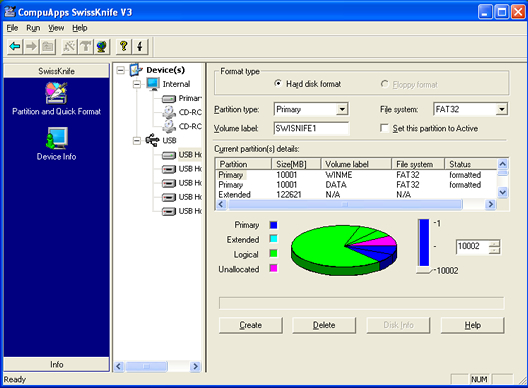
In that case, you can use a free program called SwissKnife that will allow you to format an external hard drive that is up to 2TB in size. Let’s go through both methods. In case you are having problems getting your external hard drive to show up in Windows, read my article on how to change the drive letter for an external drive in Windows.


Format external harddrive in FAT32 using DOS


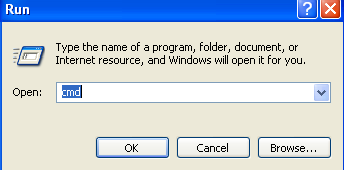
Open a command window by going to Start, then Run and typing in CMD.


command prompt


Now type in the following command at the prompt:


format /FS:FAT32 X:


Replace the letter X with the letter of your external hard drive in Windows. Windows will go ahead and begin formatting the drive in FAT32!


format external hard drive fat32


Format external hard drive in FAT32 using SwissKnife


SwissKnife is a nifty little program that is completely free and that you can use to format many types of external drives such as USB, Firewire, PCMIA, SATA and SCSI. You can also use it to create partitions on an external hard drive and it formats faster than Windows.


swissknife


So next time you want to format a hard drive in FAT32 and Windows only gives you an option for NTFS, make sure to follow one of the two method mentioned above. Enjoy!

Read more...

Followers

Quote on!!

Never expect things to happen, struggle and make them happen. Never expect yourself given a good value, create a value of your own.

Send me a Post

To send me a any posts about tricks, jokes, windows, mobiles, interesting things or technical. Please mail me at srikanthreasons420@yahoo.com